
Sunday Cyber Projects: Forged at Home, Built with Purpose: Cyber Viking Weather Console

Updated: Apr 26

Part Two: Calling the Weather from the Command Line
This wasn’t really about the weather it was about curiosity and building something useful. About taking a simple need and turning it into something hands-on.
So I shifted gears… and went full Cyber Viking. 🔥🖥️ Build with Purpose
⚔️────────────────────────⚔️
Discovering the Right Tool
After some research, I landed on a tool that sits quietly on most systems—
but carries serious power: cURL
If you’ve never used it before, here’s the simple version: cURL is a command-line tool that lets you communicate with systems over the internet. Instead of opening a browser, you can pull data, test connections, and interact with services directly from the terminal.
It supports things like HTTP, HTTPS, FTP, and more—but for this project, the important part is this:
🛡️ It works right from Command Prompt
🛡️ And it’s already installed on Windows 11
No downloads. No setup. Just open cmd.exe and start exploring.
⚔️────────────────────────⚔️
When Windows and Linux Don’t Agree
This is where things started to get interesting.
Even though cURL works across platforms, Windows and Linux don’t always behave the same way. And if you’re learning this for the first time, those small differences can feel bigger than they are.
One of the first things I ran into was line endings. Windows uses CRLF (carriage return + line feed), while Linux uses LF (line feed only). It sounds minor—and it is—but it can change how output looks or how scripts behave.
Then there’s command syntax.
Linux tends to be consistent. Windows Command Prompt? Not always. Quotes, backslashes, spacing—sometimes they matter more than you expect.
It doesn’t mean one is better than the other. It just means you have to understand the environment you’re working in.
And that’s part of the process.
⚔️────────────────────────⚔️
Realizing What cURL Can Do
At first, I was just trying to get the weather.
But the more I worked with cURL, the more I realized—it’s not just a one-purpose tool. It’s something you can use across cybersecurity, scripting, troubleshooting, and everyday problem-solving.
With cURL, you can:
Pull data from websites and APIs
Test web servers and endpoints
Download files directly
Send data to systems (like forms or login requests)
Inspect headers and troubleshoot connections
In other words, if data is moving across the internet, cURL can interact with it.
That’s when the project started to feel bigger than the original goal.
⚔️────────────────────────⚔️
Getting Set Up (or Realizing You Already Are)
One of the best parts about this? There’s a good chance you already have everything you need.
A quick check in Command Prompt (🧠🛡️Cyber Viking Tip: When you open Command Shell make sure you are running it as Administrator)
Version Check
Command : curl --version
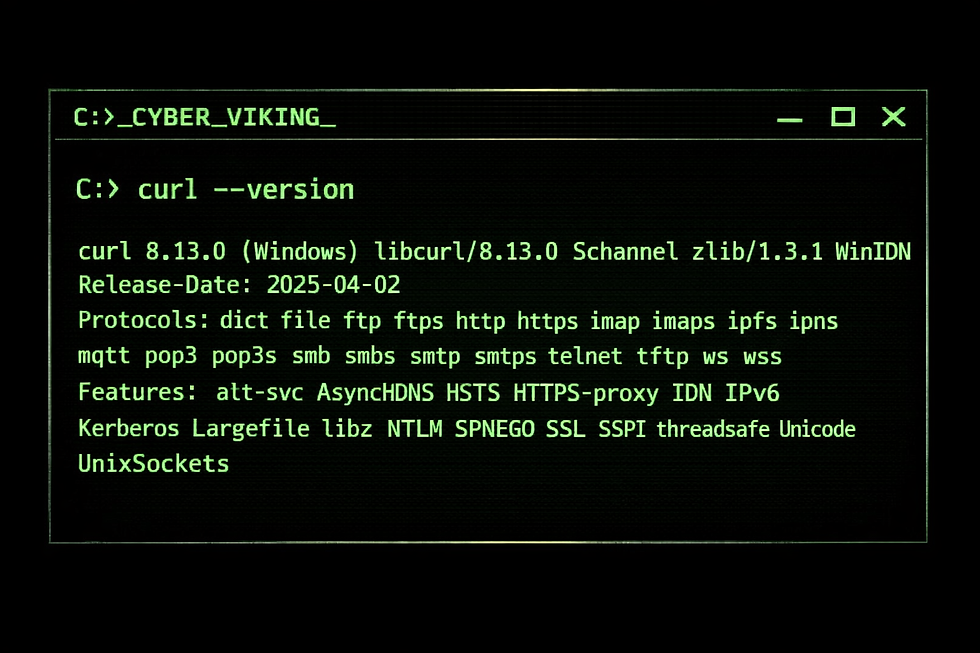
Command Prompt output showing the installed cURL version, supported protocols, and features—confirming the tool is ready for use on your system.
If you see version details—you’re ready to go.
If not, Windows makes it easy with:
Install cURL
Command : winget install curl
And if you want to keep things current:
Update cURL
Command : winget upgrade curl
Simple. Clean. No friction.
⚔️────────────────────────⚔️
🪓 Hands-On: Run These in Command Prompt [⚡CMD]

Open Command Prompt and try each of these. These are safe, simple, and perfect for building confidence.
1. Grab a Simple Web Page
curl http://example.com
🛡️ This pulls the raw HTML of a webpage—what your browser normally hides.
2. Explore How Web Requests Work (Great for Learning)
🛡️ Returns detailed information about your request (IP, headers, and more)
🛡️ This is a powerful way to see what your system is sending out
Try this one too:
The command sends a request to httpbin and returns a JSON response showing the HTTP headers your system used. It’s mainly used to see exactly what information your request is sending to a server.
3. Work with a Practice API (Real Data, Safe Environment)
🛡️ Simulates a real API response
🛡️ Perfect for learning how applications pull structured data
4. Connect to a Real-World Platform
🛡️ Pulls live data from GitHub
🛡️ Shows how real services expose data through APIs
5. Check Your Public IP Address
curl https://ifconfig.me
🛡️ Instantly shows the IP address your system is using on the internet
6. View HTTP Headers (Cyber Skills in Action)
curl -I http://example.com
🛡️ Shows response headers only—great for understanding how servers respond
7. Test Non-Secure HTTP Connections
curl http://neverssl.com
🛡️ Always uses HTTP (not HTTPS)
🛡️ Helpful for seeing the difference between secure and non-secure traffic
8. Verbose Mode (See What’s Really Happening)
curl -v http://example.com
🛡️ Displays connection details—perfect for troubleshooting and learning how requests work behind the scenes
From there, you can start exploring:
What your system sends in a request
What a server sends back
How APIs structure their data
What headers reveal about a connection
⚔️────────────────────────⚔️
🔥Why This Matters
This project was never just about pulling the weather. It was about understanding how systems communicate. It’s easy to take the internet for granted—click a link, load a page, move on. But underneath that simplicity is a constant exchange of requests and responses happening in real time.
When you start using tools like cURL, you step into that process. You’re no longer just using technology—you’re interacting with it.
Whether you’re:
Exploring on your own
Teaching others
Preparing for competitions or real-world cyber work
This is one of those foundational skills that changes how you see things.
⚡🔥⚡🔥⚡🔥⚡🔥⚡🔥⚡
⚔️ Final Thought
At the end of the day, cURL runs strong on both Windows and Linux. Linux might feel a bit more natural out of the gate, but Command Prompt is just as powerful once you understand how it operates—and that’s the real takeaway from this journey.
Not just learning commands…but learning how your environment works.
Because in the world of the Cyber Viking…We don’t just run commands—we understand them.
⚔️ The Cyber Viking
🔥 Cyber Like A Viking


Comments