
Summer of Cyber '26 – Event #3

CyberTexas Foundation CyberPatriot Standard Camp 2026
Summer of Cyber Event #3 is officially in the books!
This week I had the privilege of serving as a Lead Instructor for the CyberTexas Foundation CyberPatriot Standard Camp, and what an incredible five days it was.
Every year I leave camp exhausted, energized, inspired, and reminded why I love teaching cybersecurity.
Over the course of five days, students learned about operating systems, cybersecurity fundamentals, Windows 11, Linux Mint, command-line tools, cyber careers, teamwork, and competition skills. But more importantly, they learned how to think like defenders.
And as always, they reminded me that learning can be a whole lot of fun.
From creating AI-powered Cyber Heroes to learning Windows security, exploring Linux, surviving a social engineering attack disguised as "CyberPatriot Answer Keys," hearing from cybersecurity professionals, and competing in a CyberPatriot-style competition, the week was packed with learning, laughter, and unforgettable moments.
Here's a look back at an incredible week of cybersecurity education, hands-on learning, and future cyber defenders in action.
Day 1: AI Like A Viking
Before we touched Windows 11, Linux, networking, or cybersecurity tools, we started camp with a topic that is rapidly changing the world around us:
🤖 Artificial Intelligence.
One of my goals this year was to ensure students learned how to use AI responsibly, ethically, and effectively.
Throughout the day, students explored what AI is, how it works, its strengths and limitations, prompt engineering, and how cybersecurity professionals are already using AI in the field.
Most importantly, we discussed why AI should never replace critical thinking.
To put those lessons into practice, students created their own Cyber Heroes using AI as a creative assistant.
Each student developed:
⚡ Hero Names
⚡ Powers
⚡ Missions
⚡ Backstories
⚡ Logos
⚡ Character Artwork
The results ranged from serious cyber defenders protecting critical infrastructure to some truly hilarious creations that had the entire classroom laughing.
The lesson was simple:
AI doesn't replace creativity.
It amplifies it.
And that lesson would carry forward throughout the entire week.
Before dismissing the students, I also issued a warning.
For the rest of the week, I would be playing the role of "The Hacker."
I reminded everyone that cybersecurity is about protecting systems, devices, and data.
At the time, most of the students laughed.
A few days later, that warning would come back to haunt them.
Day 2: Exploring Windows 11 and Thinking Like a Defender

After spending Day 1 exploring Artificial Intelligence and creating Cyber Heroes, it was time to shift our focus to one of the most important tools used by cybersecurity professionals every day:
Windows 11.
The morning began with students presenting the Cyber Heroes they had created the previous day.
Some presentations were simple.
Some were incredibly detailed.
One student even created an entire comic book around their character.
Watching students combine creativity, storytelling, and technology was a fantastic way to start the day and demonstrated just how powerful AI can be when paired with imagination.
Splitting Into Teams
After the presentations, we divided into two learning tracks.
Paulina worked with the middle school and beginner students while I continued with the high school and advanced students as we began our deep dive into Windows 11.
Throughout the morning, students explored several critical cybersecurity concepts that serve as the foundation for both real-world cybersecurity and CyberPatriot competition success.
Topics included:
🔐 Encryption
🪪 Authentication and Verification
📱 Multi-Factor Authentication (MFA)
🔑 Password Security
⚔️ Password Attacks
⚙️ Windows Control Panel Navigation
👤 Account Policies
🔒 Password Policies
📋 Auditing Policies
🛡️ Windows Security
🦠 Microsoft Defender
🔍 Security Scanning
🌐 App and Browser Control
For many students, this was their first opportunity to look beyond the desktop and begin understanding what is happening behind the scenes inside the operating system they use every day.
As the discussions continued, students quickly discovered that cybersecurity is not built on a single tool or setting.
It is built on layers of protection working together.
The Great Firewall Demonstration
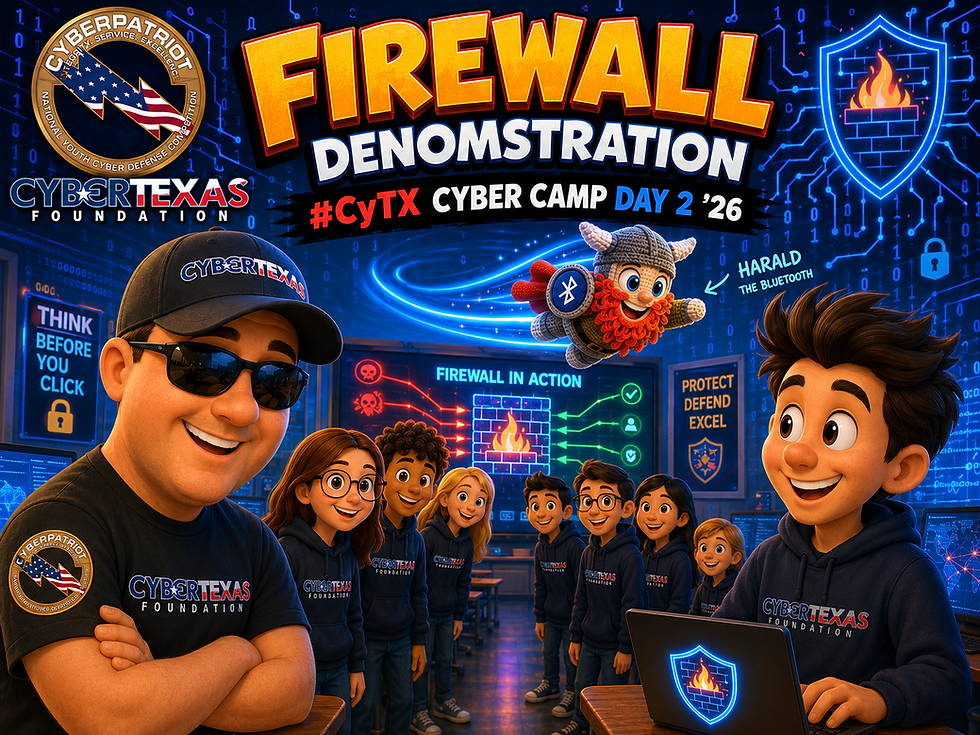
One of the highlights of the day was our live firewall demonstration.
Sometimes the best way to understand a technical concept is to physically act it out.
To demonstrate how firewalls work, I recruited several students to form a human firewall across the classroom while another student stood on the opposite side representing an external website.
Meanwhile, Harald the Bluetooth—my trusty Cyber Viking sidekick—volunteered to become a data packet.
In the first scenario, I acted as a normal user visiting a trusted website.
Harald safely traveled through the firewall, communicated with the trusted destination, and returned without issue.
The firewall allowed the traffic because it was expected and legitimate.
Then we changed the scenario.
This time I attempted to visit an unknown and potentially malicious website.
Without warning, the students on the far side of the room tossed Harald right over the heads of the firewall students.
"My firewall failed and I've been hacked!" I announced.
The room immediately erupted in laughter.
After requesting that Harald be thrown a little lower next time, we repeated the exercise.
This time the firewall students successfully blocked the unauthorized traffic before it could reach me.
As more students joined the firewall line, we discussed the many different forms of firewalls that help protect us every day:
🔥 Windows Defender Firewall
🏠 Home Router Firewalls
🏢 Enterprise Firewall Appliances
🌐 Network Security Devices
🛡️ Web Application Firewalls (WAF)
The activity provided a fun and memorable way for students to visualize how firewalls protect computers, devices, and entire networks.
And thankfully, Harald survived the demonstration.
Hands-On Windows Administration
Following lunch, students moved from theory into practice.
Rather than simply hearing about account management and permissions, they got to experience it firsthand.
Students learned how to:
👤 Create user accounts
❌ Delete user accounts
⚙️ Modify user roles and permissions
🖥️ Explore administrative functions within Windows
Nothing reinforces learning quite like getting hands-on experience.
Entering the CyberPatriot Mindset
After a short break, we transitioned into my special presentation:
CyberTexas Foundation Windows 11 CyberPatriot Standard Camp Cyber Viking Add-On
This session focused on helping students understand what it takes to succeed in CyberPatriot competition.
More importantly, it introduced them to what I call the CyberPatriot Mindset.
CyberPatriot isn't just about knowing commands.
It's about thinking like a defender.
Students were introduced to several essential Windows tools that competitors regularly use and discussed what I call "The First 10 Minutes"—the critical opening moments of every CyberPatriot competition.
Students quickly realized that successful competitors aren't necessarily the fastest.
They're the most methodical.
As the day came to a close, students were beginning to think less like computer users and more like cyber defenders.
Little did they know that Day 3 would bring command-line tools, social engineering, a guest speaker, and one very suspicious file named:
📄 CyberPatriot Answer Keys.
Day 3: Command Lines, Social Engineering, and Real-World Cybercrime

Day 3 was one of the busiest and most entertaining days of camp.
The high school students spent the morning building their own Interactive Windows Command Shell Toolkit using batch files.
Rather than simply memorizing commands, students learned how commands can be combined to create useful tools for troubleshooting, administration, and cybersecurity.
While the high school students were building their toolkits, I also spent time working with our middle school campers discussing two of the most powerful tools built into Windows:
💻 Command Shell (CMD)
🖥️ PowerShell

We explored the differences between the two environments, what each tool is designed to do, and how system administrators, network engineers, and cybersecurity professionals use them every day.
Of course, what they didn't realize was that the #CyTX Team and I had been planning something special.
Back on Day 1, I had warned everyone that throughout the week I would be playing the role of "The Hacker."
Apparently, some of them forgot.
Working together, the #CyTX Team quietly copied one of my harmless joke batch files onto every middle school laptop.
Then we renamed it:
📄 CyberPatriot Answer Keys
And we waited.
When the moment finally arrived, I instructed everyone to open the file. At the same time.
Instantly, Command Shell windows began opening all over the room.
Messages started appearing.
Programs launched.
Commands executed.

And students suddenly realized something was happening.
The expressions on their faces were priceless.
Some were shocked.
Some started laughing.
Some immediately began trying to figure out what was happening.
And several loudly announced:
"I GOT HACKED!"
The lesson hit home immediately.
Every student had willingly executed an unknown file because they believed it contained something valuable.
In that moment, they experienced one of the oldest cybersecurity attacks in existence:
Social Engineering.
Thankfully, the batch file was completely harmless.
The lesson, however, was very real. Attackers often don't need advanced exploits when curiosity, trust, and urgency do the work for them.
That lesson was reinforced later that afternoon.
We welcomed special guest speaker Jonathan Gonzalez, AVP of Cyber Threat Intelligence at Synchrony, Cyber, Fraud, and Financial Crime—and a former CyberPatriot competitor.

Watching students go from hesitant questions to an active discussion about cyber threat intelligence, financial crime investigations, attack scenarios, and cybersecurity careers was one of the highlights of the entire week.
Those moments are exactly why camps like this matter.
Day 4: Linux Mint Foundations
Day 4 looked a little different for me.
While I was fulfilling my civic duty at the Bexar County Courthouse for jury service, Mrs. Rita Flores stepped in and led camp for the day.
I cannot thank her enough for doing such an outstanding job.
Mrs. Flores introduced students to Linux Mint and laid the foundation for the Linux administration and cybersecurity concepts we would continue exploring on Day 5.
For many students, Linux was completely unfamiliar territory.
Students learned Linux navigation, files and directories, user accounts, permissions, administrative functions, and command-line operations.
The students also had the opportunity to hear from guest speaker Paul J. Guerra, who shared valuable insights about cybersecurity careers, investigations, fraud cases, security operations, and lessons learned from real-world incidents.
Day 4 ended with students realizing that Linux wasn't nearly as intimidating as it first appeared.
Day 5: Linux, Guest Speakers, and the Final Showdown

By the time Friday morning arrived, our campers had already survived AI, Windows 11, command-line tools, social engineering attacks, and my attempts to convince them that I was secretly the camp hacker.
But the week wasn't over yet.
In fact, some of the most important lessons were still ahead.
Before I dive into Day 5, I want to once again give a huge shoutout to Mrs. Rita Flores for stepping in and leading Day 4 while I was fulfilling my civic duty at the Bexar County Courthouse.
Mrs. Flores did an outstanding job introducing the students to Linux Mint and preparing them for what would become a full Linux adventure on our final day of camp.
When the students arrived Friday morning, we picked up right where we left off.
And for many of them, Linux was still a strange new world.
Gone were the familiar Windows menus.
Gone were the icons they had grown up with.
Instead, students found themselves navigating directories, managing permissions, working with software packages, and learning how operating systems function behind the scenes.
What started as uncertainty quickly turned into curiosity.
Then confidence.
By the end of the morning many students were navigating Linux like they had been using it for weeks.
🎤 Learning from the Pros
Before jumping back into Linux, students had the opportunity to hear from Mr. Wendell Ladd, Vice President of Cybersecurity at Travelers.
One message stood out above all others:
Cybersecurity professionals never stop learning.
Technology changes.
Threats change.
Tools change.
And the best defenders are the ones who continue growing with them.
Later in the day, students also heard from David Webb, who shared additional insights from his own experiences in technology and cybersecurity.

The students weren't just hearing about cybersecurity careers.
They were hearing directly from people living them.
🏆 The Final Showdown

Then came the moment everyone had been waiting for.
Competition Time.
The room instantly transformed.
Teams huddled together.
Keyboards started clicking.
And students got to work.
Over the course of the competition, students applied everything they had learned throughout the week.
AI concepts.
Windows administration.
Command-line tools.
Linux skills.
Cybersecurity fundamentals.
Problem-solving.
Teamwork.
And critical thinking.
As I walked around the room, I couldn't help but smile.
On Monday, many of these students had little or no cybersecurity experience.
Now they were confidently navigating systems, troubleshooting problems, and discussing solutions like seasoned competitors.
Every team encountered challenges.
Every team made mistakes.
Every team learned something new.
And every team improved.
Because in cybersecurity, learning is winning.
When the final scores were tallied and awards were presented, there were plenty of smiles, celebrations, and proud moments.
But the biggest victory wasn't a trophy.
It wasn't a certificate.
It wasn't a score.
The biggest victory was seeing how much confidence these students had gained in just five days.
They arrived as campers.
They left as future cyber defenders.
And that is what CyberPatriot camp is all about.
More Than a Camp
Over five days, students learned far more than Windows commands, Linux skills, and AI prompts.
They learned how to think critically.
They learned how to solve problems.
They learned how to work together.
They learned how to adapt.
And they learned that cybersecurity is ultimately about protecting people.
Some discovered a passion for cybersecurity.
Some discovered new technical skills.
Some discovered that Linux isn't nearly as scary as it looks.
And some discovered that maybe they shouldn't open files labeled "CyberPatriot Answer Keys."
Most importantly, they learned that cybersecurity is not about memorizing commands or collecting certifications.
It's about developing a mindset.
And I can't wait to see what they accomplish next.
The Team Behind the Camp
While campers experience the lessons, labs, competitions, and guest speakers, they don't always see the incredible team working behind the scenes to make camp successful.
None of this would have been possible without the dedicated CyberTexas Foundation team.
A special thank you to:
👩🏫 Mrs. Rita Flores (Guest Instructor)
Guest Speakers
🎤 Jonathan Gonzalez
🎤 Paul J. Guerra
🎤 Wendell Ladd
🎤 David Webb
The CyberTexas Foundation Team
⚙️ Joe Sanchez
📋 Mia Orozco
🤝 Amada Hernandez
👩🏫Middle School Instructor
📚 Paulina Chavez
🦸 Our Volunteers, Mentors, and Supporters
🔧 Jasiah Ortega
💡 Michael Okwulehie
🚀 Derek Wei
🎯 Jacob Williams
👨👩👧👦 The parents who entrusted us with their students
And most importantly...
🎓 The campers.
Thank you for bringing your enthusiasm, creativity, curiosity, and willingness to learn each day.
You are the reason we do this.
Until the Next Adventure...
Summer of Cyber Event #3 may be complete, but Summer of Cyber '26 is far from over.
My next stop will be DoD STARBASE Kelly, where I will have the opportunity to speak with students attending their STEM Camp and share the exciting world of cybersecurity, technology, digital citizenship, and cyber careers.
Then on July 13th, we begin another incredible journey as the CyberTexas Foundation CyberPatriot Advanced Camp kicks off.
There are still more students to meet.
More lessons to teach.
More stories to tell.
And more adventures ahead.
Until the next adventure...


Comments